I moved the last managed RDS instance off my stack fourteen months ago. The bill dropped by more than half. Query latency went from single-digit milliseconds to microseconds. And I sleep fine, because the backup pipeline is something I can read, test, and trust.
This post is about why self-hosted Postgres makes sense for most production workloads under a certain scale, how to think about the cost math, and exactly how to back up in a way that survives a total server loss.
The Real Cost of Managed
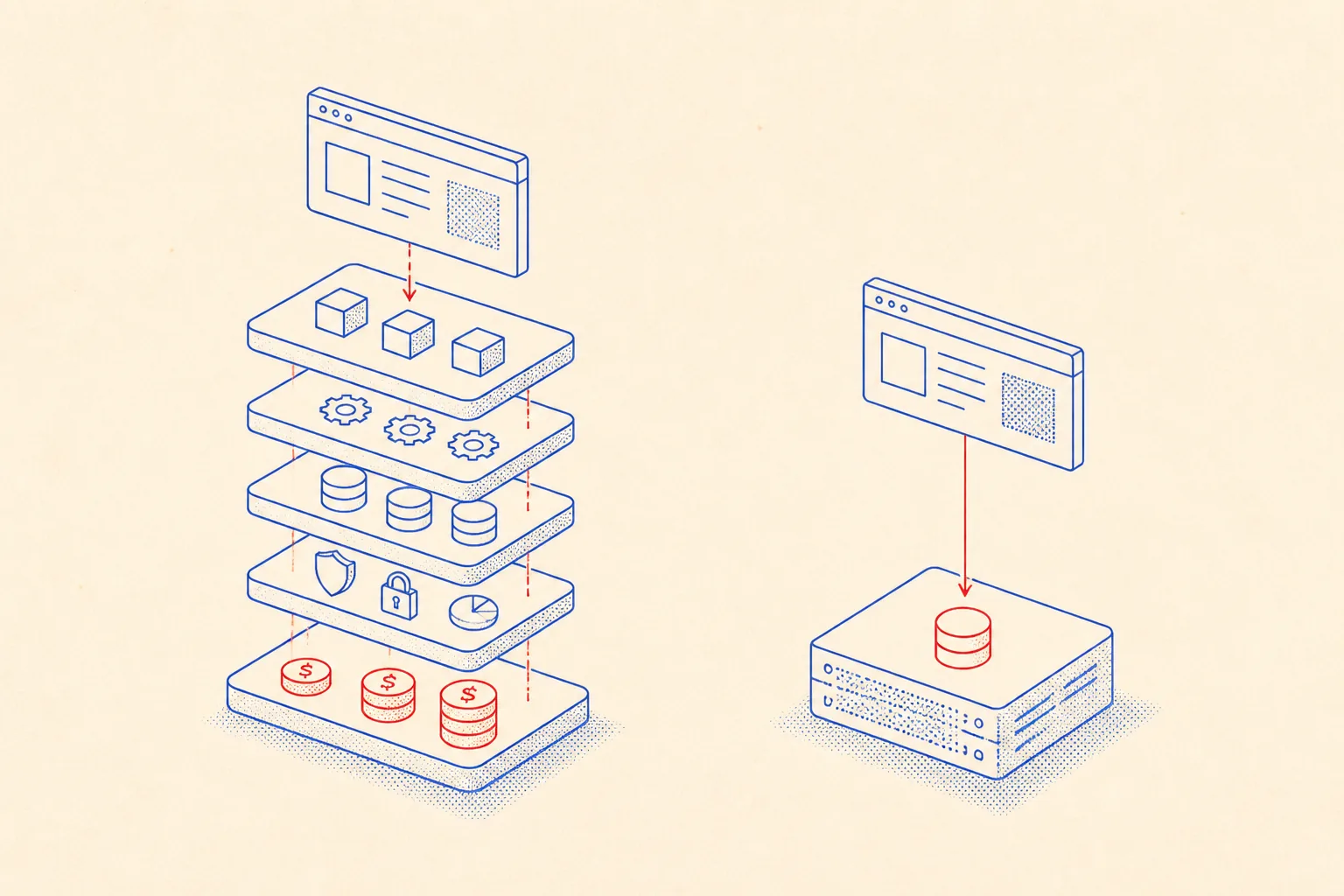
Managed database services like RDS, Cloud SQL, and Neon sell you a promise: don't think about it. That promise is priced accordingly. You pay for the instance, you pay a storage markup, you pay for multi-AZ standby, and then, quietly, you pay for egress. Every gigabyte of data your application reads out of the managed service and sends somewhere else costs money. On RDS in us-east-1 that's around $0.09/GB. On a busy analytics workload, that adds up before you notice.
- Instance markup: managed services typically charge 2x to 3x the raw compute cost versus a VPS of equivalent specs.
- Storage premium: EBS-backed RDS volumes cost more per GB than a dedicated block device on Hetzner or OVH.
- Per-connection overhead: RDS throttles connections at the engine level and pushes you toward PgBouncer or RDS Proxy, which is a billable add-on.
- Egress fees: network transfer out of a managed service is metered; a self-hosted server on the same LAN as your app pays nothing.
- Snapshot pricing: automated backups consume S3 storage at list price, billed separately.
Compare that to a Hetzner AX41 (AMD Ryzen 5, 64 GB RAM, 2x 512 GB NVMe in RAID-1) at roughly €45/month. You host Postgres, your app, and a reverse proxy on the same box. The database talk never leaves the loopback interface.
Localhost Latency vs a Network Hop
When your app and Postgres run on the same machine, you can connect over a Unix socket. A Unix socket bypasses the TCP stack entirely. A round-trip query that takes 1.2 ms over a loopback TCP connection takes under 0.1 ms over a Unix socket. That's not a marginal improvement on a hot path with fifty queries per request.
Even if you run your app on a separate server and connect over a private LAN, you are still beating a managed service sitting in a different availability zone by at least one full network hop. AWS guarantees sub-1ms intra-AZ latency, which sounds good until you realize your app is likely hitting the database hundreds of times per page load.
Lock-In and the Portability Argument
Managed databases drift. AWS Aurora is Postgres-compatible, not Postgres. It has its own replication protocol, its own storage engine quirks, its own limits on extensions. When you need pg_cron, timescaledb, or a custom FDW, the managed tier either blocks you or charges extra for a higher instance class that supports it.
A self-hosted Postgres 17 is exactly Postgres 17. You install what you want. You upgrade when you decide to. You migrate to a different host by dumping and restoring, which takes minutes for databases under 50 GB.
The Backup Objection, Answered Concretely
The most common pushback: "managed services handle backups automatically." True. But automated backups you have never restored are not backups. They are comfort. The right response to the backups objection is not to argue philosophy but to show the actual pipeline.
Here is what a real nightly backup looks like. It compresses the dump with zstd (fast, excellent ratio), encrypts it with age (simple, key-based, no GPG ceremony), and ships it to an offsite S3-compatible bucket. The restore is a single pipeline going the other direction.
#!/usr/bin/env bash
# backup-pg.sh, nightly Postgres dump + compress + encrypt + upload
# Runs as the postgres system user via cron or systemd timer.
# Requires: pg_dump, zstd, age, rclone (configured with a remote called "b2")

set -euo pipefail

DB_NAME="${DB_NAME:-myapp}"
BACKUP_DIR="/var/backups/postgres"
DATE=$(date -u +%Y-%m-%dT%H%M%SZ)
FILENAME="${DB_NAME}_${DATE}.sql.zst.age"
AGE_PUBKEY="${AGE_PUBKEY:?set AGE_PUBKEY env var to recipient public key}"

mkdir -p "$BACKUP_DIR"

echo "[backup] dumping $DB_NAME..."
pg_dump \
  --host=/var/run/postgresql \
  --username=postgres \
  --format=plain \
  --no-password \
  "$DB_NAME" \
  | zstd -T0 -3 \
  | age -r "$AGE_PUBKEY" \
  > "$BACKUP_DIR/$FILENAME"

echo "[backup] uploading to offsite..."
rclone copy "$BACKUP_DIR/$FILENAME" "b2:myapp-backups/postgres/"

echo "[backup] pruning local copies older than 7 days..."
find "$BACKUP_DIR" -name "*.age" -mtime +7 -delete

echo "[backup] done: $FILENAME"
The restore pipeline is the inverse. Decrypt, decompress, pipe into psql. You should run this against a staging database at least once a month. Not optional.
#!/usr/bin/env bash
# restore-pg.sh, decrypt + decompress + restore a Postgres backup
# Usage: ./restore-pg.sh backup_file.sql.zst.age target_db_name
# Requires: age, zstd, psql, age identity key at ~/.config/age/key.txt

set -euo pipefail

BACKUP_FILE="${1:?usage: restore-pg.sh <backup.sql.zst.age> <target_db>}"
TARGET_DB="${2:?usage: restore-pg.sh <backup.sql.zst.age> <target_db>}"
AGE_IDENTITY="${AGE_IDENTITY:-$HOME/.config/age/key.txt}"

if [[ ! -f "$BACKUP_FILE" ]]; then
  echo "error: backup file not found: $BACKUP_FILE" >&2
  exit 1
fi

echo "[restore] creating database $TARGET_DB if not exists..."
psql --host=/var/run/postgresql --username=postgres \
  -c "CREATE DATABASE \"$TARGET_DB\" WITH TEMPLATE template0;" || true

echo "[restore] restoring from $BACKUP_FILE into $TARGET_DB..."
age --decrypt --identity "$AGE_IDENTITY" "$BACKUP_FILE" \
  | zstd --decompress --stdout \
  | psql \
      --host=/var/run/postgresql \
      --username=postgres \
      --dbname="$TARGET_DB" \
      --single-transaction \
      --set ON_ERROR_STOP=on

echo "[restore] done."Letting an AI Agent Operate the Database
An AI coding agent working on your stack needs to know about the database the same way a new engineer does: where it lives, how to connect, what the backup schedule is, and what the safe commands are. The difference is that an agent forgets between sessions unless you give it persistent memory.
The practical solution is a short markdown file committed to the repo. The agent reads it at the start of every session and has the full operational picture. No re-explaining the socket path, no guessing the backup bucket name, no accidentally running a destructive query on production because the agent assumed the wrong DATABASE_URL.

Here is what that file looks like in practice for a self-hosted Postgres setup:
# AGENTS.md, Database Operations

## Connection

- Engine: Postgres 17, running on localhost
- Socket: /var/run/postgresql (use this, not TCP)
- App user: myapp_user (limited to SELECT/INSERT/UPDATE/DELETE on myapp schema)
- Superuser: postgres (for migrations and admin only, never use in app code)
- DATABASE_URL: postgresql:///myapp?host=/var/run/postgresql (app user, Unix socket)

## Schema

- Migrations managed by Flyway: files in /db/migrations/, prefix V{version}__description.sql
- Run migrations: flyway -url="jdbc:postgresql:///myapp?socketFactory=..." migrate
- Never edit an existing migration file. Always create a new one.

## Backups

- Schedule: nightly at 02:00 UTC via systemd timer (pg-backup.timer)
- Script: /opt/scripts/backup-pg.sh
- Local retention: 7 days in /var/backups/postgres/
- Offsite: Backblaze B2 bucket myapp-backups/postgres/
- Encryption: age, recipient key in /etc/backup/age-pubkey.txt
- Restore script: /opt/scripts/restore-pg.sh <file> <target_db>
- **Test restores monthly.** Last tested: 2026-03-01, succeeded.

## Safe Commands

```bash
# Check Postgres status
systemctl status postgresql

# Tail live query log (caution: verbose)
tail -f /var/log/postgresql/postgresql-17-main.log

# Manual backup now
sudo -u postgres /opt/scripts/backup-pg.sh

# Connect as app user
psql "postgresql:///myapp?host=/var/run/postgresql" -U myapp_user
```

## Gotchas

- Do NOT run VACUUM FULL during business hours; it takes an exclusive lock.
- pg_hba.conf uses peer auth for local Unix connections; no password needed for postgres system user.
- Extensions installed: uuid-ossp, pg_stat_statements, pg_cron (cron.database_name = myapp).
- pg_cron jobs are in the myapp schema, table cron.job. List with: SELECT * FROM cron.job;
With this file in the repo and referenced in your main CLAUDE.md or AGENTS.md, any agent session starts with a full operational picture. It knows the socket path, the user permissions, the backup schedule, the migration tool, and the gotchas. It can run migrations, check backup status, or investigate a slow query without you re-explaining the setup every time.
The file doubles as onboarding documentation for human engineers. Write it once, keep it accurate, and both audiences benefit.
What You Actually Need to Run This
The operational overhead of self-hosted Postgres is real but small. You need to handle OS updates, Postgres version upgrades, and monitoring. None of this is exotic.
- Monitoring:
pg_stat_statementsplus a Prometheuspostgres_exportersidecar. Grafana dashboard takes twenty minutes to set up. - Connection pooling: PgBouncer in transaction mode. One config file, starts in minutes, handles thousands of concurrent connections.
- Replication: streaming replication to a second server is straightforward from Postgres 10 onward. For most workloads, your offsite backup is sufficient and simpler.
- Security:
pg_hba.confpeer auth on Unix sockets means no network exposure for local connections. Lock down port 5432 withufwor your VPS firewall. - Upgrades:
pg_upgradehandles major version upgrades in-place. Test on a clone first. Plan for a maintenance window of under an hour.
The complexity of self-hosting Postgres is one afternoon of setup and one markdown file that keeps the system legible. The complexity of managed databases is a billing dashboard with twelve line items you check only when something is wrong.
Run your own database. Read the logs once. Build the backup pipeline, test the restore, commit the AGENTS.md. After that, it just runs.