Making a short video is a pile of small, annoying jobs: write a script, record a voice, cut captions that land on the right word, find or animate visuals, time the cuts, export at the right size, then write a caption and hashtags for the platform. I wanted one prompt to do all of it. So I built a skill for AI coding agents that does exactly that, and the presentation video for it was made by the skill itself.
One prompt, one finished video
The skill plugs into an AI coding agent like Claude Code or Codex. You type /video and describe what you want, a 30-second TikTok about your app, a one-minute explainer, a Reel for a product launch. The agent interviews you briefly (platform, tone, voice, look), confirms a short plan, and then runs the whole production end to end without you touching a timeline.
Nothing is uploaded to a web app. The pipeline runs inside your own agent on your machine; the only things that leave are the API calls for the voice and the caption timing. What you get back is a real MP4 in an out/ folder and a social-copy.md next to it.
The pipeline
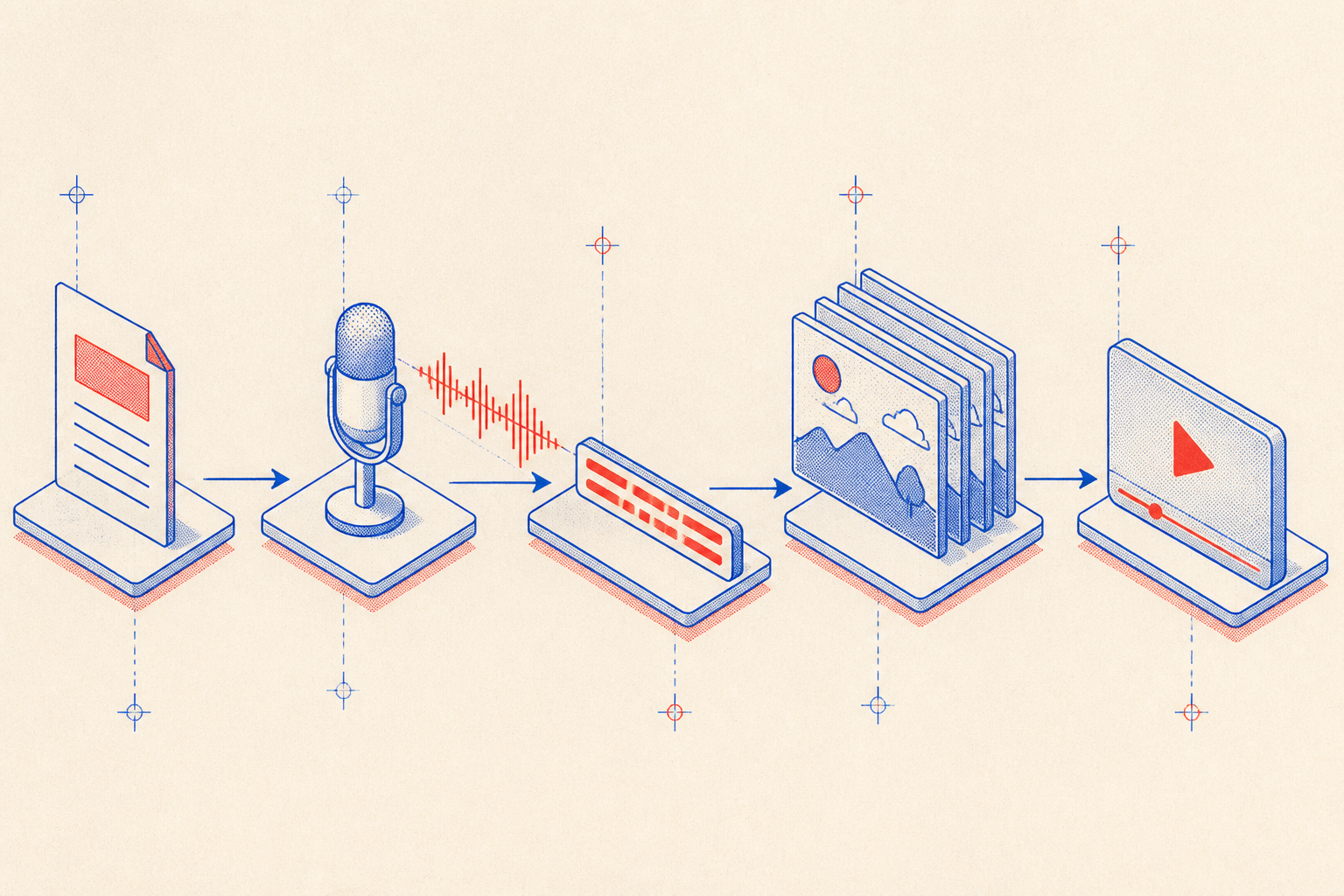
Each stage feeds the next. The voice defines the length, the transcript defines the caption timing, and the scene cuts snap to the pauses in the narration. Because everything derives from the voice, the final video is always perfectly in sync, there is no manual nudging of keyframes.
- Script, written to the platform (~150 words/min), hook to call-to-action, shown for approval before anything is generated.
- Voice, OpenAI
gpt-4o-mini-tts(natural, default voicemarin); ElevenLabs optional for a richer read. - Captions,
whisper-1transcribes the voice with per-word timestamps, so words appear one at a time, exactly on beat. - Scenes, animated SVG scenes authored from this specific script, cutting on the narration's pauses.
- Render, Remotion (React) renders an MP4 whose duration matches the voice, sized for TikTok, Reels, Shorts or YouTube.
- Social copy, a ready title, caption and hashtags for the chosen platform.
Word-perfect captions
The captions are the part people notice first. Each word is highlighted at the exact moment it is spoken, because the timing is not guessed, it comes from the transcript. In Remotion, the current frame maps to a time, and the word whose window contains that time is the active one. The whole caption component is just a few lines:
// One word lights up exactly when it is spoken.
// The timings come straight from whisper-1's transcript.
export const Caption = ({words, frame, fps}) => {
  const t = frame / fps;
  const active = words.findIndex((w) => t >= w.start && t < w.end);
  return (
    <h1 className="caption">
      {words.map((w, i) => (
        <span key={i} style={{opacity: i === active ? 1 : 0.35}}>
          {w.text + " "}
        </span>
      ))}
    </h1>
  );
};
That is the entire trick: the transcript carries start and end for every word, Remotion gives you the current frame, and you light up whichever word owns the moment. No keyframing, no drift.
Scenes that illustrate the script
The default look is animated SVG scenes drawn from the script itself, not stock footage. The agent reads the lines and authors visuals that actually illustrate them, then times the cuts to the pauses in the voice so the video breathes with the narration. If you have your own images or clips, it uses those instead.
Sized per platform, rendered with Remotion
Platform choice drives the dimensions and the ideal length: 1080×1920 for TikTok, Reels and Shorts, 1920×1080 for long-form YouTube, 1080×1350 for an Instagram feed post. The render is a single command, and the output length is dictated by the voice, not a guess.
/video a 30-second TikTok about my new app

# the agent then, on its own:
# 1. writes a script sized to ~150 words per minute
# 2. gpt-4o-mini-tts  -> public/voice.mp3        (natural narration)
# 3. whisper-1        -> public/captions.json    (word-level timing)
# 4. scaffolds a Remotion (React) project
# 5. authors animated scenes that illustrate the script
# 6. remotion render  -> out/video.mp4           (length matches the voice)
# 7. writes social-copy.md (title, caption, hashtags)Try it yourself
It is open source. In Claude Code you can install it as a plugin in two lines; with any other agent, download the zip and drop it into your skills folder. Either way, set an OpenAI key and /video is available everywhere.
# Claude Code, install as a plugin
/plugin marketplace add jumpino27/Video-Skill-Remotion
/plugin install video@video-skill-remotion
The dedicated page has the demo video, the full instructions, the download and the repository.
Open the video skillView on GitHubThe voice sets the length, the transcript sets the timing, the script sets the visuals. Automate the seams and a prompt becomes a video.
This is the kind of thing I build: take a workflow that is ten manual steps, find the one signal that drives the rest, here, the voice, and let an agent run the whole chain from it. One prompt in, a finished, captioned, on-brand video out.